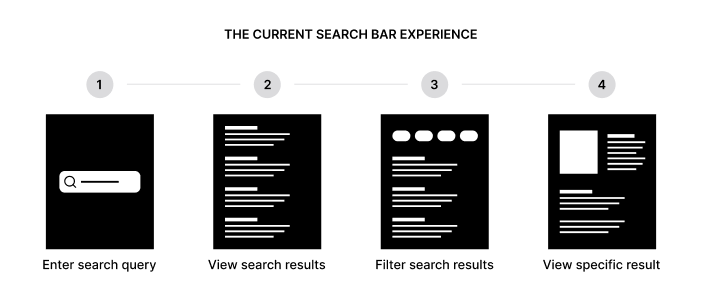
In a world where people generate and interact with more digital content than ever, the ability to find information quickly has become essential. Apps today store massive libraries of messages, documents, photos, contacts, settings, and features—so users expect fast, intuitive ways to locate what they need without endlessly scrolling or navigating menus. This is why smart search bars have become one of the most important design elements in modern apps.
A “smart search bar” is more than a simple text input. It often includes predictive suggestions, auto-complete, category filters, semantic understanding, and sometimes even AI-driven context awareness. These enhanced capabilities make search not only faster, but significantly easier, more accurate, and more satisfying.
Below is a deep dive into why people choose apps with smart search bars and why this feature is becoming a core expectation of modern UX design.
1. Smart Search Bars Save Time
Time is the biggest reason people rely on smart search bars. When apps contain thousands of files or dozens of menus, manually browsing becomes slow and frustrating.
A smart search bar can find what the user wants in seconds by offering:
- instant suggestions
- shortcuts to recent items
- keyword auto-complete
- relevant results surfaced immediately
By reducing friction, smart search bars let users stay productive without wasting time digging through the interface.
2. They Reduce Cognitive Load
Users shouldn’t have to remember exactly where something is stored. Smart search bars remove the mental burden of:
- recalling folder structures
- navigating multi-layered menus
- remembering exact file names
- locating features hidden deep in settings
Instead of thinking, “Where is that option again?” users simply type a keyword and instantly get what they need. This keeps the experience smooth and stress-free.
3. They Help Users Access Hidden or Advanced Features
Many apps contain powerful tools buried behind complex pathways. Smart search bars function like shortcuts that expose every feature instantly.
For example:
- typing “dark mode”
- typing “export”
- typing “keyboard settings”
- typing “backup”
brings up features users may not even know existed. This increases engagement and helps users get more value from the app.
4. They Improve Accuracy and Reliability
Smart search bars use intelligent ranking, meaning they serve the most relevant results first. This creates a sense of reliability.
Instead of guessing:
- which version of a file is correct
- which chat thread contains the right information
- which photo matches the keyword
smart search bars process metadata and patterns to return accurate matches consistently.
People trust apps that help them find exactly what they need without errors.
5. They Support Natural Language Searching
Modern search bars often allow natural language input, meaning users can type how they speak:
- “photos from last summer”
- “documents about budgeting”
- “messages from Sarah yesterday”
- “tasks due next week”
This eliminates the need to memorize specific terms or file titles. The search bar interprets meaning, not just keywords, making the experience smooth, intuitive, and human-friendly.
6. They Enable Personalized and Context-Aware Results
Smart search bars often learn from user behavior to improve efficiency over time:
- showing frequently opened files
- prioritizing recent conversations
- suggesting searches the user often repeats
- anticipating needs based on time, location, or activity
For example, if someone regularly searches for “finance reports” every Monday morning, the smart search can surface them automatically.
This personalization makes the app feel more responsive and intelligent.
7. They Reduce Frustration in Large or Complex Apps
Apps with large feature sets—productivity tools, cloud storage apps, messaging platforms, editing software—can overwhelm new or casual users. Smart search bars act as the universal navigation tool that cuts through complexity.
No matter how deep the UI goes, one search bar unifies the experience. This reduces frustration, especially for:
- beginners
- people in a hurry
- users unfamiliar with the UI layout
- accessibility-focused users
Smart search bars democratize access, helping everyone find what they need equally well.
8. They Speed Up Onboarding for New Users
When new users join an app with many features, the learning curve can be steep. Smart search bars flatten that curve by giving instant access to:
- tools
- tutorials
- account settings
- quick actions
Instead of exploring every menu, users simply type what they want. This reduces drop-off rates and increases user satisfaction early on.
9. They Enhance Productivity Across All Device Types
On mobile devices especially, users don’t want to tap endlessly through small menus. Smart search bars provide a quick, ergonomic interaction.
On desktop, where apps have larger feature sets, they prevent navigation overload.
On tablets and hybrid devices, smart search bars unify the experience across touch and keyboard inputs.
In short: smart search bars make workflows smoother across all platforms.
10. They Improve File and Content Management
For apps that store content—notes, tasks, images, emails, documents—smart search bars are essential. Users depend on them for:
- filtering by date
- searching by tags
- categorizing by type
- finding similar content
- surfacing duplicates
- scanning text inside documents
Without smart search, content-heavy apps feel chaotic and disorganized.
11. They Offer Predictive Suggestions That Speed Up Input
Smart search bars frequently suggest:
- frequently searched items
- recent files
- related options
- common keywords
- category filters
This reduces typing effort significantly.
For example, typing “inv” may instantly show:
- “Invoices”
- “Invoice templates”
- “Invoice export settings”
This saves time and minimizes typos.
12. They Help Reduce On-Screen Clutter
Apps with smart search bars can afford simpler, cleaner interfaces because users no longer rely solely on menus. Instead of displaying dozens of navigation options at once, designers can hide complexity behind a powerful search mechanism.
A cleaner UI improves:
- readability
- focus
- visual comfort
Smart search bars essentially allow minimalism without sacrificing functionality.
13. They Support Voice Input and AI Integration
Modern search bars often integrate with voice search, allowing users to say what they want instead of typing.
AI capabilities also enhance the experience by:
- auto-correcting queries
- understanding intent
- predicting next steps
- suggesting related content
As AI improves, smart search bars become even faster and more helpful.
14. They Increase User Satisfaction and Loyalty
People return to apps that feel effortless to use. A smart search bar:
- reduces frustration
- increases speed
- enables discovery
- simplifies navigation
- helps users feel in control
This increases retention and long-term loyalty.
When users recommend an app, one of the first things they mention is how easy it is to find things—smart search bars play a huge role in that perception.
15. They Reflect Modern User Expectations
Search bars used to be optional. Today, they are expected.
Users—especially younger generations—expect:
- instant access
- smart suggestions
- semantic search
- filters and categories
- context-aware intelligence
Apps that lack smart search feel outdated.
Conclusion
People choose apps with smart search bars because they make life easier. They save time, reduce cognitive load, help users discover features, improve accuracy, and provide a seamless experience across all devices. As apps grow more complex and content-rich, smart search bars have transitioned from a helpful feature to an essential one.
They are now one of the most powerful tools for navigating digital experiences—helping users stay productive, organized, and in control.